Compare final payable totals for the same quantities and relevant conditions. Delivery charges can reverse the menu-price comparison.
Use the checkout total. The menu price is only part of what you pay.
Here are two invented offers for a comparable meal. App A lists it at $25 adds $3.50 delivery and $2 in other charges, then applies a $3 discount. Its total is $27.50. App B lists it at $26.50 with $1 in charges and no delivery fee; its total is also $27.50. Taxes are assumed included for this example.
If App A’s discount requires adding a $6 drink, the original $27.50 comparison no longer applies. Recalculate with the condition satisfied. The basket has changed along with the price.
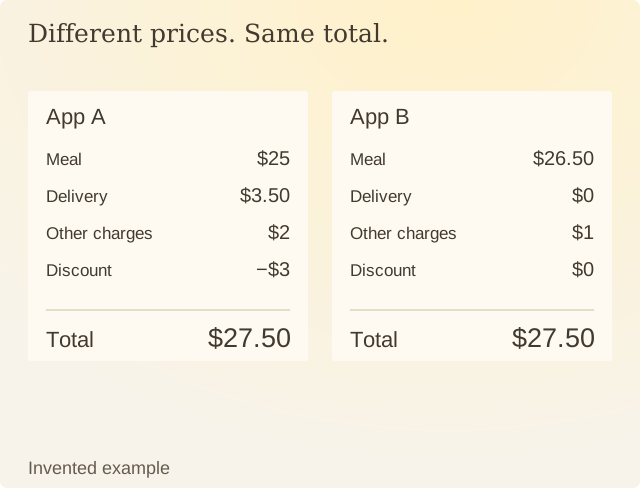
Read the values
| Item | Value |
|---|---|
| App A: Meal | $25 |
| App A: Delivery | $3.50 |
| App A: Other charges | $2 |
| App A: Discount | −$3 |
| App A: total | $27.50 |
| App B: Meal | $26.50 |
| App B: Delivery | $0 |
| App B: Other charges | $1 |
| App B: Discount | $0 |
| App B: total | $27.50 |
Keep portion size and the actual seller in view. Equal totals for different quantities are different offers. Delivery time, availability and a cancellation condition may also matter to the task.
The FTC’s online-shopping guidance recommends considering costs and terms alongside the item. The arithmetic here uses invented dollar amounts; it makes no claim about current prices on a named delivery service.
For an actual comparison, use the same address and items. Record both final totals close together in time. A promotion displayed before location or eligibility checks may not be available at checkout. Compare what each checkout asks you to pay.
Sources
FTC: Online shoppingConsumer guidance on price comparisons, seller information and return terms.